Der aktuelle Artikel unterstützt die von Ihnen gewählte Sprache nicht. Er wurde automatisch für Sie auf Englisch empfohlen.
How to manage collateral settings in the unified trading account
[Estimated reading time: 3 mins]
This article explains how to customize collateral settings in Bitget's unified trading account and how these settings affect margin usage and trading risk.
Collateral usage in the unified trading account
In Advanced mode, Bitget's unified trading account lets you use multiple assets as collateral across different trading products. When a coin is enabled as collateral, its value is automatically converted to USD using a collateral ratio. The resulting amount is counted as adjusted equity and can be used in:
-
Spot margin trading (cross margin)
-
Futures trading (cross margin)
-
Other eligible products
Bitget provides three ways to configure which coins can be used as collateral:
-
Mainstream coins: Use only major cryptocurrencies like BTC and ETH as margin, prioritizing liquidity and reducing volatility risk.
-
All eligible coins: Enable all supported assets as collateral. This option is suitable for users who want to maximize capital efficiency. Newly listed eligible assets will also be automatically included.
-
Custom selection: Manually choose specific coins to be used as collateral based on your own trading strategy or asset allocation preferences.
Impact on trading after enabling or disabling collateral
1. When a coin is enabled as collateral:
-
The coin is counted as adjusted equity in your unified trading account.
-
It can be used to support cross-margin spot margin trading and cross-margin futures trading.
-
The value of the coin is shared across all cross margin trades, along with the associated trading risk.
2. When a coin is disabled as collateral:
-
The coin is excluded from the adjusted equity calculation in your unified trading account.
-
It can no longer be used for cross-margin spot margin trading or cross-margin futures trading.
-
The coin will no longer contribute to the shared margin pool for cross margin trades.
Rules to follow before changing collateral settings
1. USDT is always enabled as collateral and cannot be disabled.
2. You cannot disable a coin as collateral if doing so would result in:
Occupied margin / adjusted equity ≥ 100%
3. To avoid negatively affecting the cross margin ratio, you cannot disable collateral for a coin if it is currently involved in any of the following:
-
Open positions
-
Pending orders
-
Borrowings
-
Negative balances in spot trading, spot margin trading, or futures trading
How to customize collateral settings
Collateral settings are only supported in Advanced mode. If you cannot find the entry point, check whether your account mode is set to Advanced mode. For more details, refer to: How to switch to unified trading account mode.
On the website
Option 1: From the trading page
1. Go to any spot, spot margin, or futures trading page.
2. On the right side, find the accounts module.
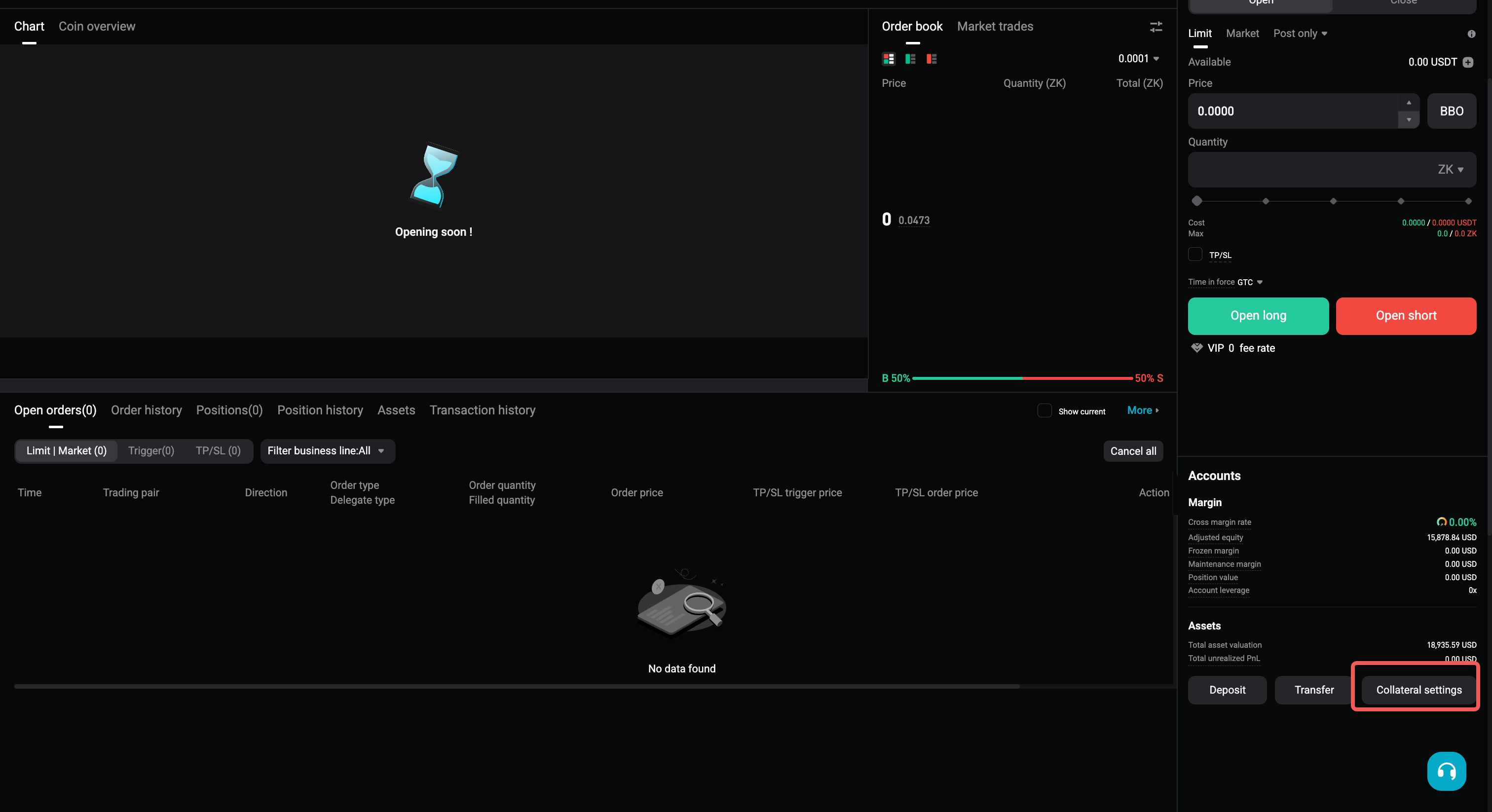
3. Scroll to the bottom and click Collateral Settings to open the management panel.
Option 2: From the unified trading account overview
1. Go to the Assets Overview section and open the Unified Trading Account tab.
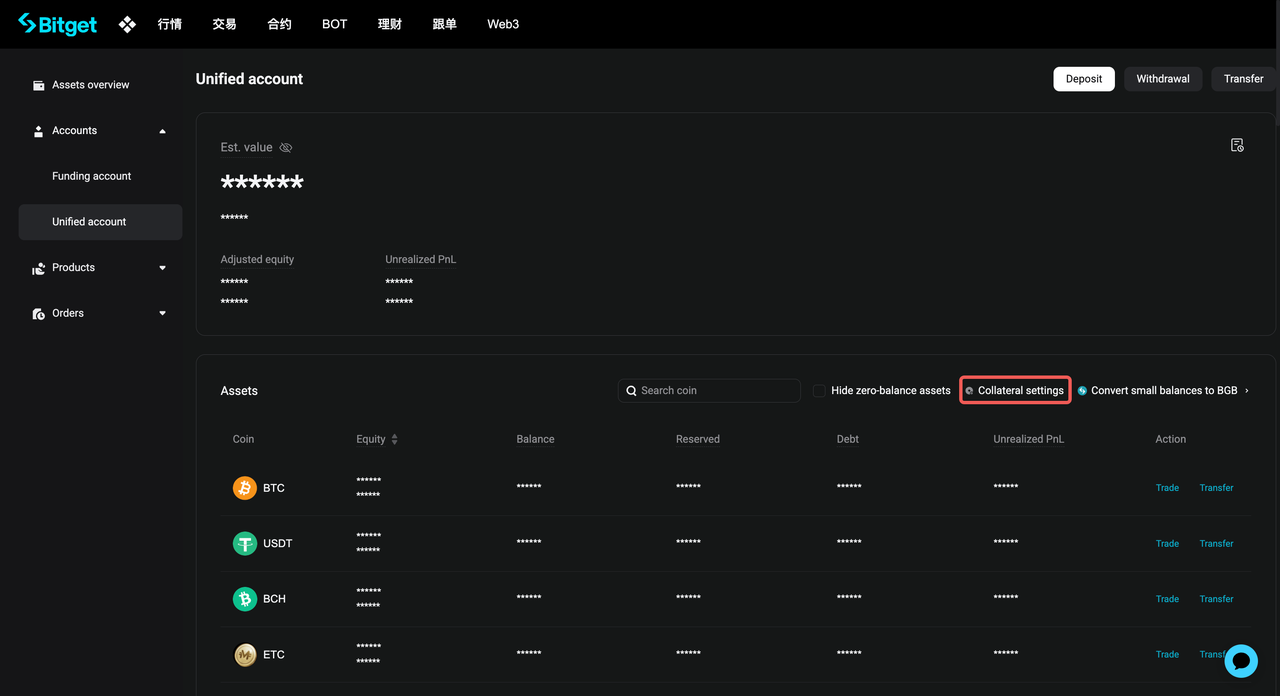
2. At the top of the asset list, click Collateral Settings to configure your preferences.
On the app
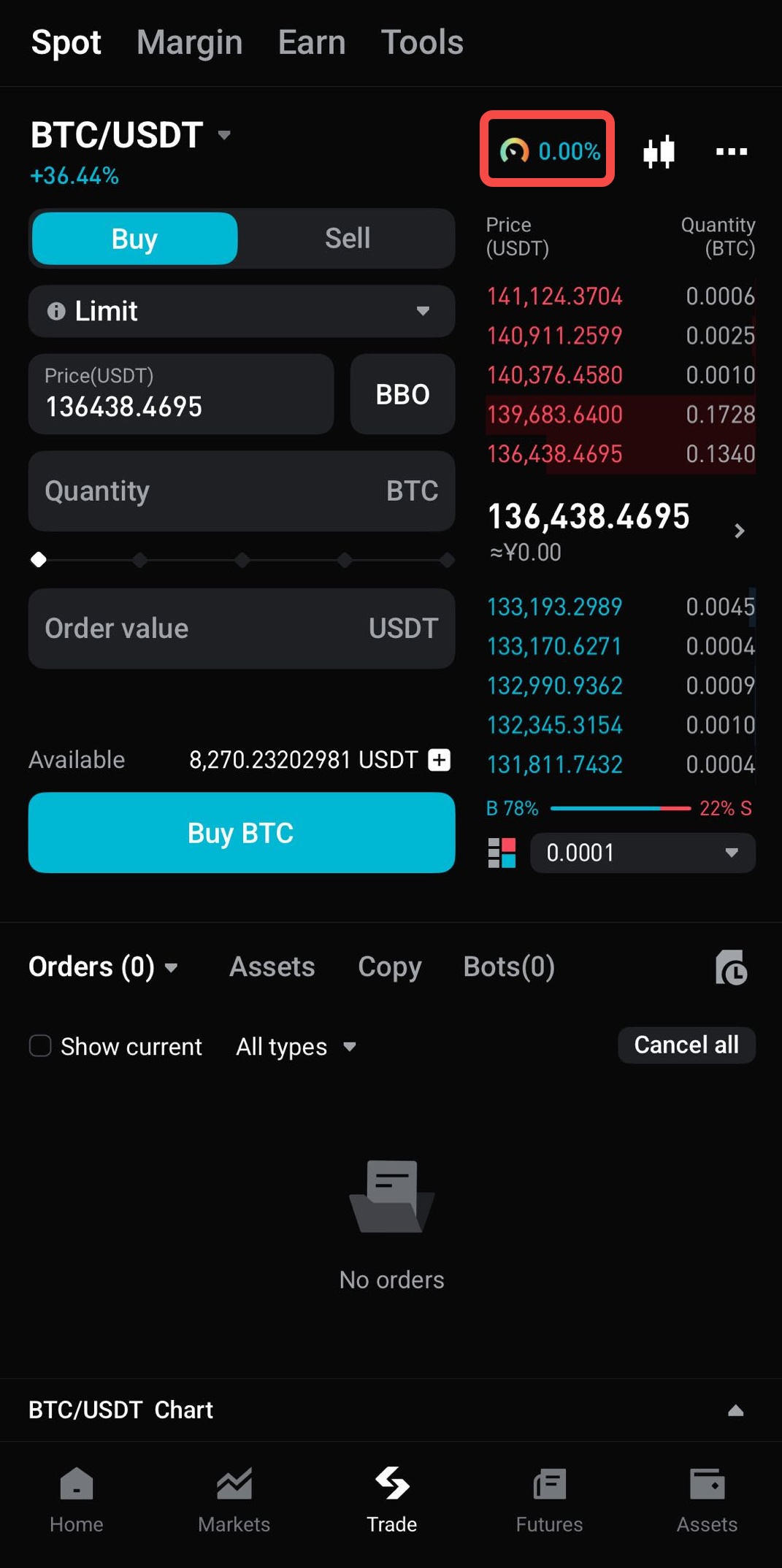
Option 1: From the trading interface
1. Go to any spot, spot margin, or futures trading pair page.
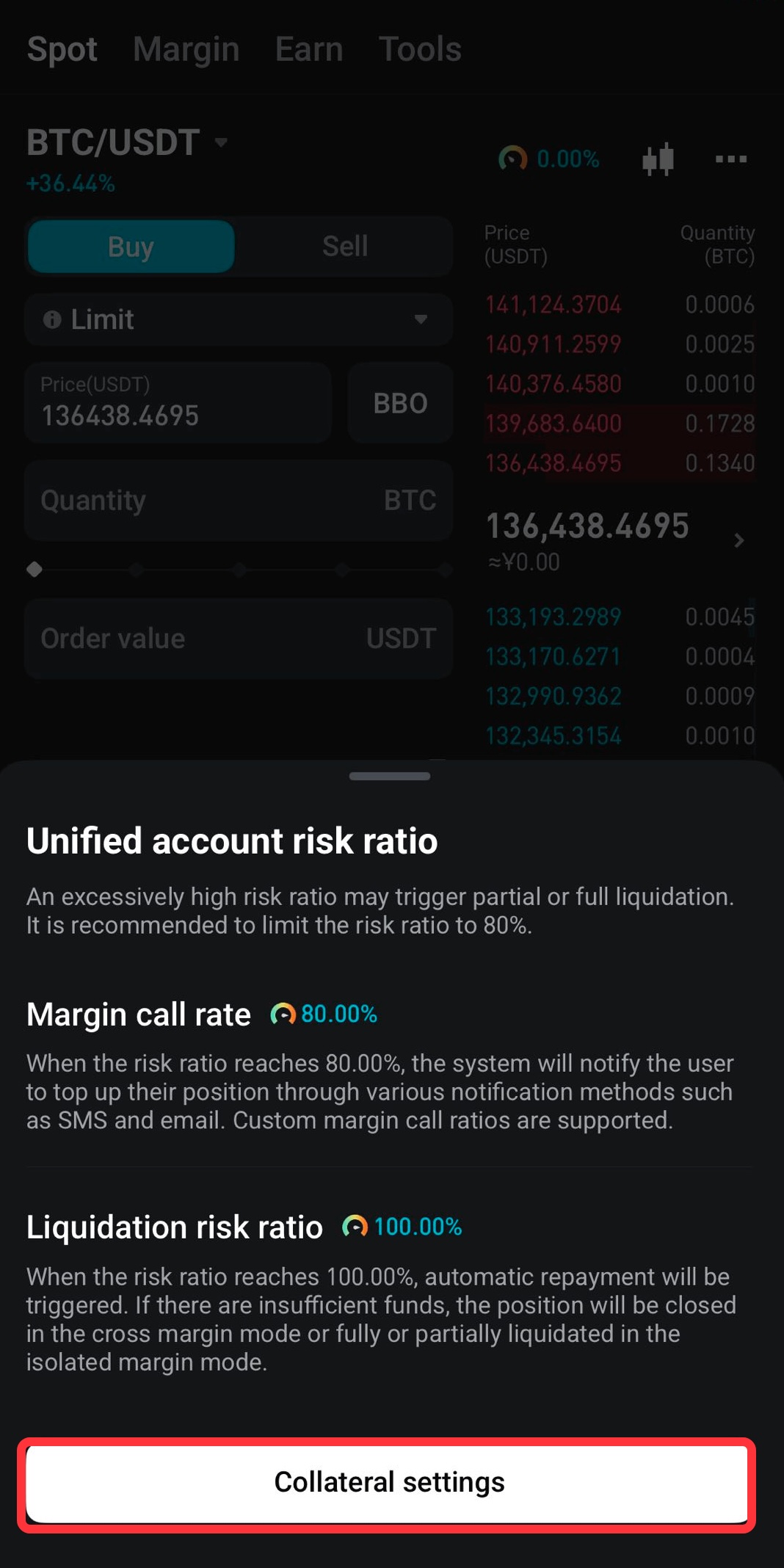
2. Tap the unified trading account risk ratio shown below the price chart.
3. In the pop-up window, tap Collateral Settings to adjust your collateral setup.
Option 2: From the Assets page
1. Tap the Assets tab in the bottom navigation bar.
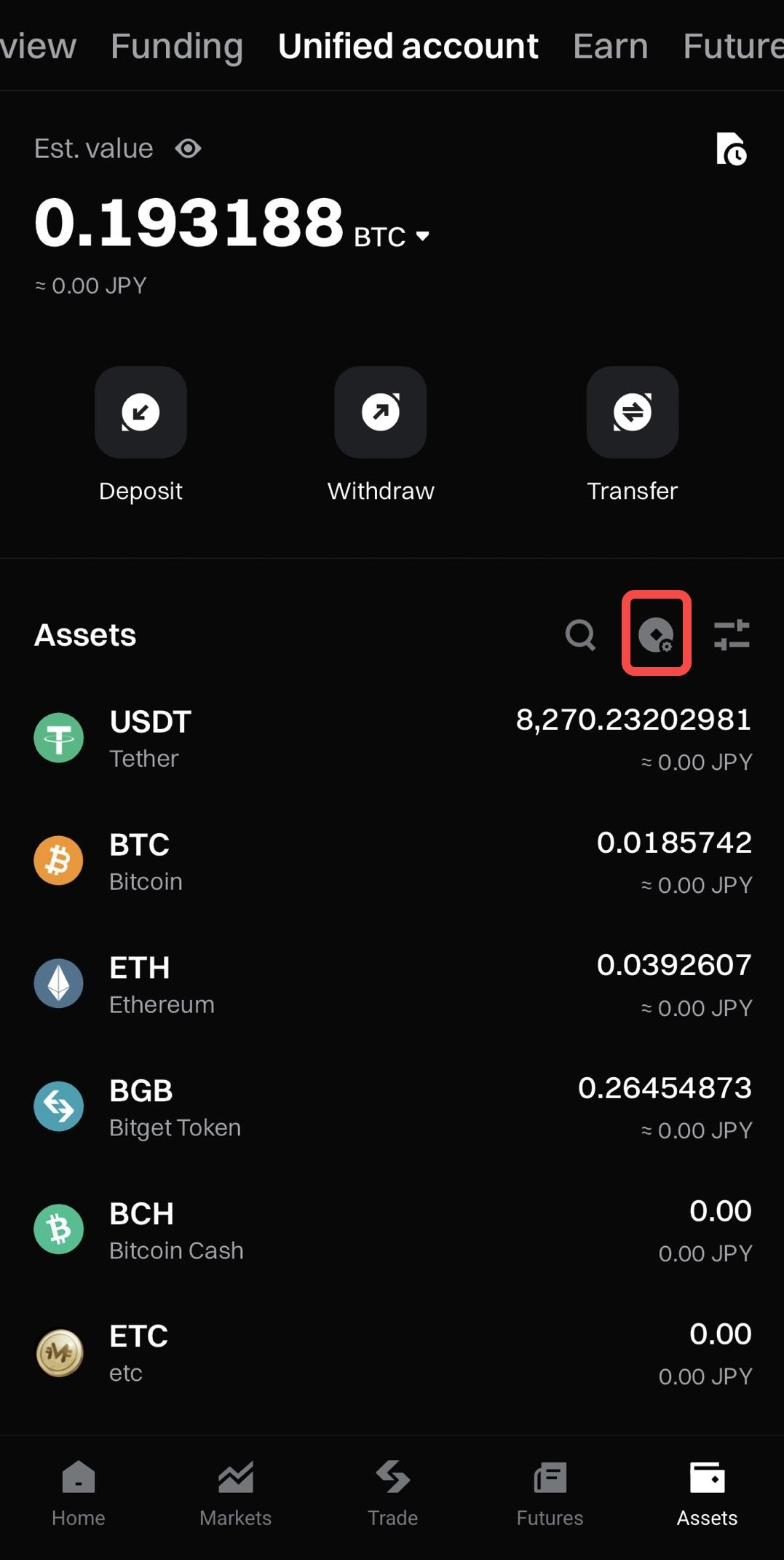
2. On the unified trading account screen, tap the shield icon in the top-right corner to open collateral settings.
3. Tap the Collateral Settings icon in the top-right corner of the screen.
FAQ
1. What trading products support collateral in the unified trading account?
Collateral can be used for spot margin trading, futures trading, and other eligible products. All cross margin trades share the same collateral pool.
2. What collateral setting options are available?
There are three options: Mainstream coins, All eligible coins, and Custom selection. Mainstream coins include major cryptocurrencies such as BTC and ETH. All eligible coins include all supported assets, including newly listed eligible assets. Custom selection lets you manually choose specific coins.
3. What happens when I disable collateral for a coin?
The coin is removed from the adjusted equity calculation and can no longer be used for cross-margin spot margin trading or cross-margin futures trading. It becomes risk-isolated and can only be used for spot trading.
4. Why am I unable to disable collateral for a coin?
You cannot disable collateral if the coin is involved in open positions, pending orders, borrowings, or negative balances in spot trading, spot margin trading, or futures trading. You also cannot disable it if doing so would cause your occupied margin to equal or exceed 100% of adjusted equity.
5. Where can I find Collateral Settings?
You can access collateral settings from the trading page through the accounts module, the unified trading account assets page, the unified trading account risk ratio pop-up, or the shield icon on the assets page in the app.
Join Bitget, the World's Leading Crypto Exchange and Web3 Company